What Is Kerberos? Tickets, KDC, SPNs, and Troubleshooting
How Kerberos authenticates without sending passwords: the KDC, TGTs and service tickets, a real packet capture, klist, SPNs, and a diagnosis order for failures.

- What Is Kerberos, and Where Does the Name Come From?
- Three Heads, Three Parties
- Why the Password Never Crosses the Network
- The Ticket Model: KDC, AS, and TGS
- TGT vs. Service Ticket
- krbtgt: The Account That Signs Tickets
- How Kerberos Works: From AS-REQ to AP-REQ
- First Exchange: Proving Identity
- Second Exchange: Getting a Service Ticket
- Third Exchange: Going to the Service
- Watching Kerberos in Wireshark
- The Real Flow: One Message Longer Than the Textbook
- What’s Inside the Packets?
- The Third Exchange Goes to the Service, Not the KDC
- When the Clock Drifts: Measured, and Not What We Expected
- Reading Tickets: klist, Lifetimes, and SPNs
- Where Ticket Lifetimes Are Set
- What Is an SPN? The Most Often Misconfigured Part
- Diagnosing Kerberos: From Symptom to Error Code
- Kerberos vs. NTLM, and the Silent Fallback
- Diagnosis Order
- Conclusion: The Dog at the Gate Knows Nobody
Kerberos is an authentication protocol that lets users and services on a network prove who they are to each other without sending passwords. It does it with time-limited tickets: a user proves their identity once at sign-in, receives a document valid for a set time, and for the rest of the day shows that document at every door instead of a password. That’s what runs behind every Active Directory sign-in, on port 88.
The name isn’t an accident. In Greek mythology, a three-headed dog guards the gate of the underworld ruled by Hades: Kerberos, or Cerberus. Its job is to check who passes, and passage depends not on who you are but on the valid document you carry. MIT took the name when it built the protocol within Project Athena, starting in 1983, because the design had exactly three parties. This article stays at that gate.
It covers what Kerberos is and who the three heads stand for, the KDC architecture that issues tickets, the message flow from sign-in to a file share, that same flow in Wireshark at packet level, the real tickets on a machine read with klist, and finally a diagnosis order from symptom to error code. It’s part of the Active Directory guide and assumes the DNS foundation from Active Directory DNS. If you have a system that can’t authenticate right now, jump to diagnosing Kerberos.
What Is Kerberos, and Where Does the Name Come From?
Kerberos is a ticket-based protocol that lets two parties prove their identity to each other over an untrusted network. The version in use today is Kerberos 5, defined in RFC 4120, which replaced RFC 1510 from 1993. Windows, Linux, macOS, and many enterprise applications speak the same protocol; Kerberos isn’t a Microsoft technology. What Microsoft did was make it the default authentication method of Active Directory.
Three Heads, Three Parties
The three heads stand for the three parties to authentication: the client, the service, and the KDC (Key Distribution Center) both of them trust. That triangle explains the whole protocol, because the problem Kerberos solves is this: how do two parties who have never met trust each other without exchanging passwords?
Everyday life already has the answer. Entering an office building, the security guard doesn’t know you and doesn’t need to. You show ID once in the lobby, you’re given a pass for the day, and you badge through every door with it. The door on the fifth floor doesn’t know you; it knows the pass, and it trusts whoever issued it.
That’s Kerberos’s architecture, and the consequence is the opposite of what most people expect: the service never asks the KDC to verify you. The ticket arrives encrypted with the service’s own key; if the service can open it, it knows the issuer really was the KDC. That detail is also why the protocol scales: across thousands of users and thousands of file accesses, the domain controller stays out of the traffic.
Why the Password Never Crosses the Network
Kerberos is designed so the password is never carried on the network. Instead, both sides turn the password into an encryption key, and each proves it knows the key by decrypting something. The password itself is in no message.
In the mid-1980s that was radical. Most protocols of the time sent usernames and passwords in plain text, readable by anyone on the same cable; Telnet and FTP still carry that flaw. Project Athena had to tie thousands of shared workstations on the MIT campus to one identity system, on a network where no machine could be trusted. Kerberos was born under that constraint.
The practical result holds today: an attacker listening to the network can’t pull a password out of Kerberos traffic. What they can capture is tickets, and tickets expire. In the Wireshark captures below, there isn’t a single readable password.
The Ticket Model: KDC, AS, and TGS
The KDC issues and distributes tickets; in Active Directory, every domain controller is also a KDC. It isn’t Windows-specific either: a Linux server running Samba as an AD domain controller issues the same tickets. The KDC has two jobs, defined as two services in the protocol, and knowing their names pays off directly in diagnosis.
AS (Authentication Service) verifies identity the first time. It’s the lobby ID check: you prove you know the key derived from your password and receive the pass you’ll use all day.
TGS (Ticket Granting Service) grants a specific door to whoever shows that pass. You badge at the floor you want, the system sees you’re allowed, and the door opens. TGS works on every new access; AS once per sign-in.
TGT once per sign-in; the TGS issues a fresh service ticket for each new service, and only the target service's key can open it.TGT vs. Service Ticket
Kerberos has two kinds of ticket, and mixing them up sends diagnosis the wrong way from the start.
| Property | TGT | Service ticket |
|---|---|---|
| Full name | Ticket Granting Ticket | Service Ticket |
| Issued by | AS | TGS |
| Used for | Requesting other tickets | Reaching one service |
| How many | One per sign-in | One per service used |
| Encrypted with | The krbtgt account’s key | The target service account’s key |
| Default lifetime (AD) | 10 hours | 10 hours, never beyond the TGT |
A TGT isn’t a key; it’s the right to ask for keys. Your lobby pass opens no door by itself. It only says “this person passed the lobby and was verified.” What opens a door is the door-specific permission obtained by showing that pass.
You live this every morning. At sign-in you’re asked for a password: that’s the AS step. During the day you reach the file server, the printer, the intranet, and nobody asks again; each time a separate service ticket is fetched in the background, and you never see it. That’s the mechanism behind single sign-on.
krbtgt: The Account That Signs Tickets
The key that encrypts every TGT is derived from the password of a special domain account called krbtgt. It exists in every Active Directory domain, never signs in, appears disabled, and does only this.
Why it matters, in one sentence: whoever obtains the krbtgt key can mint a valid TGT for any user in the domain, with any lifetime. That’s what attack literature calls a “Golden Ticket,” and it’s indistinguishable from one the KDC issued, because it’s signed with the same key.
How Kerberos Works: From AS-REQ to AP-REQ
The flow has three exchanges, each a request and a reply. The message names are fixed by the protocol; they’re what Wireshark shows and the prefixes of the error codes you’ll meet in event logs. All six messages, in order:
| # | Message | Direction | What happens |
|---|---|---|---|
| 1 | AS-REQ | Client → KDC | Authentication request |
| 2 | AS-REP | KDC → Client | TGT delivered |
| 3 | TGS-REQ | Client → KDC | Ticket request for a specific service |
| 4 | TGS-REP | KDC → Client | Service ticket delivered |
| 5 | AP-REQ | Client → Service | Ticket presented |
| 6 | AP-REP | Service → Client | Service proves itself (optional) |
First Exchange: Proving Identity
AS-REQ is the client telling the KDC “I’m this user, give me a TGT.” In Active Directory, the request must contain a timestamp encrypted with a key derived from the user’s password. That’s called pre-authentication, and it’s mandatory by default.
“Must contain” matters, because the client doesn’t always do it on the first try. You’ll see what really happens in the Wireshark section: the real flow is one message longer than the textbook.
This first step is why Kerberos cares so much about time. The KDC decrypts the timestamp and compares it with its own clock; if the difference exceeds the tolerance, it refuses before authentication even starts. Active Directory’s default tolerance is 5 minutes. The reason is to stop an attacker replaying a captured request later: if the stamp is stale, the request is void. The dog at the gate reads the date on the document. The document can be genuine and its bearer really who they claim; if the date is off, nobody passes.
AS-REP carries two things. The first is the TGT, encrypted with the krbtgt key, so the client can’t open it; it only carries it. The second is a session key encrypted with the client’s own key, which the client can open. That asymmetry is the heart of the protocol: you can’t read the document in your hand, but you can present it.
Second Exchange: Getting a Service Ticket
TGS-REQ is the client showing its TGT and asking for a ticket to a specific service. The service is named by its SPN (Service Principal Name). For a file server, the requested SPN looks like cifs/fs01.ad.sercebilisim.com.
The KDC opens the TGT with its krbtgt key, and if it’s valid, looks up the requested SPN in the directory and finds the account it’s registered on. The service ticket returned in TGS-REP is encrypted with that account’s key.
That sentence is the key to the whole diagnosis section, so it’s worth repeating: the KDC encrypts the ticket with the key of whichever account it found the SPN on. If the SPN is registered on the wrong account, the ticket is still issued, still reaches the client, and no error appears; but the target service can’t open it, because it isn’t its key. The fault surfaces two steps later, with a completely different symptom.
Third Exchange: Going to the Service
AP-REQ is the client finally presenting the service ticket, and the key detail is that this message doesn’t go through the KDC. The client connects straight to the file server, web server, or SQL server and hands over the ticket.
The service opens the ticket with its own key. If it can, it has verified the KDC issued it, because nobody else knows that key. It reads the user identity and group memberships inside and makes its authorization decision. If the client asks for AP-REP, the service proves itself too; that’s mutual authentication, and it prevents connecting to an impostor server.
The practical consequence keeps paying off: in some Kerberos failures the domain controller is perfectly healthy and its logs show nothing, because the broken step never touched the DC. Searching logs without knowing which exchange failed means hours on the wrong server.
Watching Kerberos in Wireshark
Kerberos messages are visible on the network, and Wireshark decodes them by name. This section doesn’t explain the protocol; it shows it. Once you’ve seen the flow at packet level, you measure where a failure stops instead of guessing.
Everything below was produced in the author’s lab: domain ad.sercebilisim.com, domain controller dc01 (192.168.1.10), domain-joined Windows 10 client PCTEST01 (192.168.1.105).
Capture on the domain-joined client, not the DC. On the DC, every machine’s traffic mixes in and you can’t isolate your own session. Set the display filter to kerberos; it covers TCP and UDP on port 88 and lists messages by name.
Commands, screenshots, and outputs come from the author’s lab domain (ad.sercebilisim.com). For a clean flow, clear the machine’s existing tickets first so the client has to build the flow from scratch:
klist purge
klist get HOST/dc01.ad.sercebilisim.com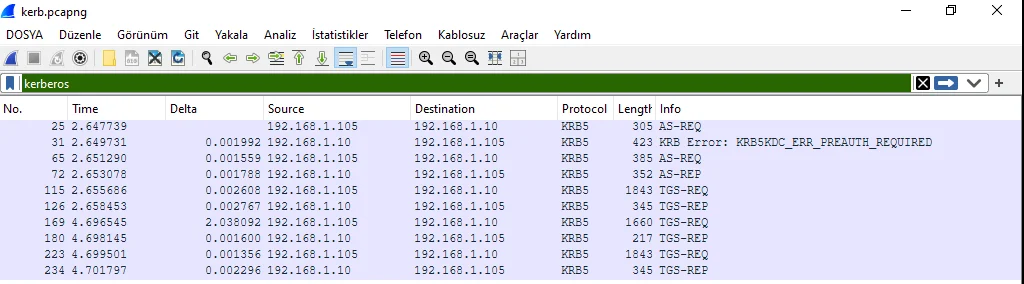
The Real Flow: One Message Longer Than the Textbook
Decoded with tshark, the capture looks like this. Three things to know first: each line is one message, and the leading number is the frame’s position in the capture; 192.168.1.105 is the client and 192.168.1.10 the domain controller; the name at the end is the message type, fixed by the protocol.
   25   2.647739  192.168.1.105 → 192.168.1.10   KRB5  305  AS-REQ
   31   2.649731  192.168.1.10  → 192.168.1.105  KRB5  423  KRB Error: KRB5KDC_ERR_PREAUTH_REQUIRED
   65   2.651290  192.168.1.105 → 192.168.1.10   KRB5  385  AS-REQ
   72   2.653078  192.168.1.10  → 192.168.1.105  KRB5  352  AS-REP
  115   2.655686  192.168.1.105 → 192.168.1.10   KRB5 1843  TGS-REQ
  126   2.658453  192.168.1.10  → 192.168.1.105  KRB5  345  TGS-REP
  223   4.699501  192.168.1.105 → 192.168.1.10   KRB5 1843  TGS-REQ
234 4.701797 192.168.1.10 → 192.168.1.105 KRB5 345 TGS-REP- Frame 25: the client asks for a TGT. This first attempt carries no proof, only the request.
- Frame 31: the KDC turns it down:
KRB5KDC_ERR_PREAUTH_REQUIRED, “prove who you are first.” - Frame 65: the client repeats the request, now with a timestamp encrypted with the key derived from its password.
- Frame 72: the KDC is satisfied and delivers the TGT.
- Frame 115: the client shows its TGT and asks for a ticket to a specific service.
- Frame 126: that service’s ticket arrives.
- Frames 223 and 234: the same exchange, for a second service.
The second line is the surprise. Textbooks describe six messages and assume the first request is accepted. In reality the client sends the first attempt empty, gets rejected, and comes back with proof. So seeing a KRB-ERROR in a Kerberos capture doesn’t by itself mean something is wrong. The rejection of the first AS-REQ appears in every healthy sign-in. What matters is the error code and whether the flow continues after it.
What’s Inside the Packets?
If there’s one field worth tracking, it’s sname, the service name: which service’s ticket this message is about. Its value tells you where in the flow you are:
krbtgt/...means the TGT. The client is still at the identity stage.- Anything else (
HOST/...,ldap/...,cifs/...) means access to a specific service. Identity is done; now it’s the door.
| Frame | Message | Requested sname |
|---|---|---|
| 25 | AS-REQ | krbtgt/AD.SERCEBILISIM.COM |
| 65 | AS-REQ | krbtgt/AD.SERCEBILISIM.COM |
| 72 | AS-REP | krbtgt/AD.SERCEBILISIM.COM |
| 115 | TGS-REQ | krbtgt/... and HOST/dc01.ad.sercebilisim.com |
| 126 | TGS-REP | HOST/dc01.ad.sercebilisim.com |
| 223 | TGS-REQ | krbtgt/... and ldap/dc01.ad.sercebilisim.com |
| 234 | TGS-REP | ldap/dc01.ad.sercebilisim.com |
Two names on the TGS-REQ lines isn’t a coincidence: Wireshark reports two message types in that frame, 12 (TGS-REQ) and 14 (AP-REQ). When the client shows its TGT to the KDC, it wraps it in an AP-REQ. So showing a TGT is itself presenting a ticket; at that moment the KDC behaves like any other service. “Show a document at every door” applies to the KDC’s own door too.
Opening the AS-REP makes the asymmetry visible. The dump below is a tree; indentation shows what’s inside what, and that’s the point. Look at cname (who received the ticket: PCTEST01$, the machine account), ticket (the ticket itself, whose sname says krbtgt, so it’s a TGT), the enc-part inside ticket, and the second enc-part one level outside it.
as-rep
    pvno: 5
    msg-type: krb-as-rep (11)
    padata: 1 item
        PA-DATA pA-ETYPE-INFO2
            etype: eTYPE-AES256-CTS-HMAC-SHA1-96 (18)
            salt: AD.SERCEBILISIM.COMhostpctest01.ad.sercebilisim.com
    crealm: AD.SERCEBILISIM.COM
    cname
        CNameString: PCTEST01$
    ticket
        tkt-vno: 5
        realm: AD.SERCEBILISIM.COM
        sname
            SNameString: krbtgt
            SNameString: AD.SERCEBILISIM.COM
        enc-part
            etype: eTYPE-AES256-CTS-HMAC-SHA1-96 (18)
            kvno: 2
            cipher: 4fcc2824c144df7f305d3758b80bce30...
    enc-part
        etype: eTYPE-AES256-CTS-HMAC-SHA1-96 (18)
        kvno: 4
        cipher: 573eb26fcbbf981b3a437287802fcff0...
One packet, two enc-part blocks, two different key numbers:
enc-part | Position | kvno | Whose key | Client can open? |
|---|---|---|---|---|
| First | Inside ticket | 2 | The krbtgt account | No |
| Second | Outside ticket | 4 | The client itself | Yes |
The KDC used two locks in one reply. The first seals the ticket body; only the KDC and the target service hold that key, so the client carries a block it can’t read. The second is for the client alone, and the session key comes out of it. A courier carrying a sealed envelope doesn’t know what’s inside, but can deliver it to the right office.
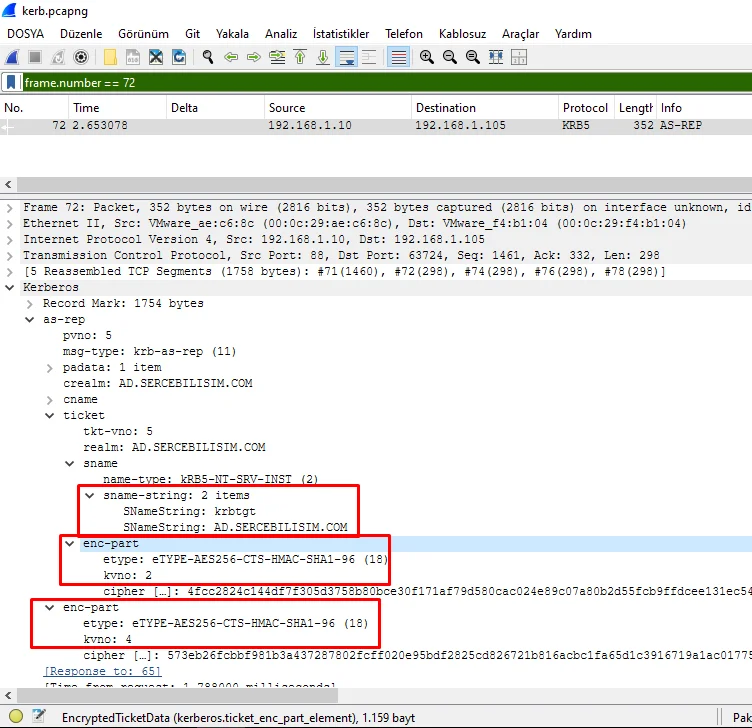
The salt is instructive too: AD.SERCEBILISIM.COM + host + the machine name. The password appears nowhere; what appears is the salt used to derive a key from it. Also note that this entire flow ran over TCP 88, not UDP. Kerberos uses both; Windows switches to TCP when a message exceeds a certain size, and in modern environments you’ll see most flows on TCP. Filter on UDP only and you’ll catch nothing.
The Third Exchange Goes to the Service, Not the KDC
In the capture above, AP-REQ only appeared wrapped inside TGS-REQ. To see the real third exchange, I opened a file share and captured again:
143  TGS-REQ  → 192.168.1.10:88    sname: cifs/dc01.ad.sercebilisim.com
154  TGS-REP  ← 192.168.1.10
235  SMB2 Session Setup Request → 192.168.1.10:445   sname: cifs/dc01.ad.sercebilisim.com
245  SMB2 Session Setup Response ← 192.168.1.10
Look at the ports; that’s the whole point. The client gets the cifs/dc01.ad.sercebilisim.com ticket from the KDC on 88, then presents it to the service on 445. In the second step no authentication question goes to the KDC; what goes is the ticket itself, embedded in the SMB session setup. “The service never asks the KDC” has its proof in these four lines: not one packet goes to port 88 while talking to the file server.
When the Clock Drifts: Measured, and Not What We Expected
The most instructive result came from an experiment. I deliberately set the client’s clock back 400 seconds (tolerance: 300) and captured the flow again. The expectation was clear: authentication would stop. Here’s what happened:
33   AS-REQ                                        →
39   KRB Error: KRB5KDC_ERR_PREAUTH_REQUIRED       ←   error-code: 25
73   AS-REQ (timestamped, clock 400 s behind)      →
79   KRB Error: KRB5KRB_AP_ERR_SKEW                ←   error-code: 37
113  AS-REQ (again)                                →
120 AS-REP ← SUCCESS- Frame 33: the usual empty request.
- Frame 39: the familiar rejection, “add proof” (
error-code: 25). - Frame 73: the client adds the timestamp, but its clock is 400 seconds behind, so the stamp is wrong.
- Frame 79: the KDC rejects it, this time because of the clock:
KRB_AP_ERR_SKEW,error-code: 37. - Frame 113: the client tries once more.
- Frame 120: and gets the ticket.
With the clock still 400 seconds behind, klist get succeeded and the file share worked. The error was produced, but authentication didn’t stop. The reason sits in the error packet:
krb-error
    msg-type: krb-error (30)
    stime: Aug  7, 2026 21:10:09
    error-code: eRR-PREAUTH-REQUIRED (25)
When the KDC sends an error, it includes its own time (stime). The Windows client reads it, adjusts its Kerberos timestamp to the KDC’s clock, and retries. The protocol can compensate for clock skew within a single round.
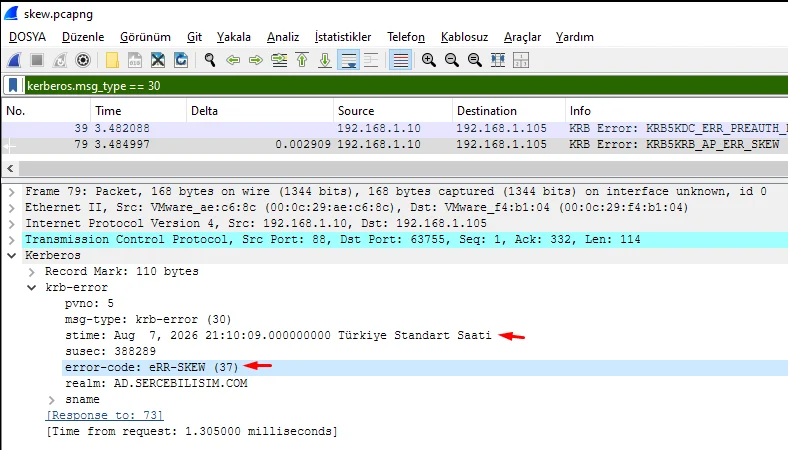
The field translation: “the clock drifted, so Kerberos stopped” isn’t true everywhere. On a network with Windows clients, sign-in can keep working with minutes of skew while the failure shows only on certain devices. Some of the “works for one user, not the other” authentication faults come from exactly this. The dog refused the document’s date, but told the traveler the right one; the traveler fixed it and walked in. The gate is strict, not deaf.
Reading Tickets: klist, Lifetimes, and SPNs
klist lists the Kerberos tickets currently cached on a Windows machine. It ships with Windows, and diagnosis starts here, because whether a ticket exists splits the whole flow in two. The real output from PCTEST01 in the lab:
Current LogonId is 0:0x3e7

Cached Tickets: (2)

#0>     Client: pctest01$ @ AD.SERCEBILISIM.COM
        Server: krbtgt/AD.SERCEBILISIM.COM @ AD.SERCEBILISIM.COM
        KerbTicket Encryption Type: AES-256-CTS-HMAC-SHA1-96
        Ticket Flags 0x40e10000 -> forwardable renewable initial pre_authent name_canonicalize
        Start Time: 8/7/2026 20:53:27 (local)
        End Time:   8/8/2026 6:53:27 (local)
        Renew Time: 8/14/2026 20:53:27 (local)
        Session Key Type: AES-256-CTS-HMAC-SHA1-96
        Cache Flags: 0x1 -> PRIMARY
        Kdc Called: dc01.ad.sercebilisim.com

#1>     Client: pctest01$ @ AD.SERCEBILISIM.COM
        Server: HOST/dc01.ad.sercebilisim.com @ AD.SERCEBILISIM.COM
        KerbTicket Encryption Type: AES-256-CTS-HMAC-SHA1-96
        Ticket Flags 0x40a50000 -> forwardable renewable pre_authent ok_as_delegate name_canonicalize
        Start Time: 8/7/2026 20:53:27 (local)
        End Time:   8/8/2026 6:53:27 (local)
        Renew Time: 8/14/2026 20:53:27 (local)
        Session Key Type: AES-256-CTS-HMAC-SHA1-96
        Cache Flags: 0
        Kdc Called: dc01.ad.sercebilisim.com
These two entries are the two ticket types from earlier. Two ways to tell them apart, both in this output:
- The
Serverfield.#0sayskrbtgt/AD.SERCEBILISIM.COM: the right to ask for tickets, a TGT.#1saysHOST/dc01.ad.sercebilisim.com: access to one service, a service ticket. - The
initialflag, only on#0. It says the ticket came directly from password verification; service tickets don’t carry it, because they were obtained by showing a TGT.
The times confirm the theory: Start Time 20:53:27, End Time the next morning at 6:53:27, exactly 10 hours. Renew Time a week later, exactly 7 days. Both are Active Directory defaults. Also worth reading: the encryption types (AES-256 here; RC4-HMAC would mean an old configuration and a hardening candidate), ok_as_delegate (the service may carry the client’s identity on to another service), and Kdc Called, the DC that issued the ticket, the first field to check where there are several DCs.
klist tgt shows only the TGT; klist purge clears the cache harmlessly, since tickets are fetched again on the next access.
Where Ticket Lifetimes Are Set
Lifetimes are set in domain policy, not on machines: Computer Configuration > Windows Settings > Security Settings > Account Policies > Kerberos Policy.
| Setting | Default | What it does |
|---|---|---|
| Enforce user logon restrictions | Enabled | KDC checks each ticket request against the user’s logon rights |
| Maximum lifetime for service ticket | 600 minutes | Service ticket lifetime |
| Maximum lifetime for user ticket | 10 hours | TGT lifetime |
| Maximum lifetime for user ticket renewal | 7 days | Renewal window |
| Maximum tolerance for computer clock synchronization | 5 minutes | Clock tolerance |
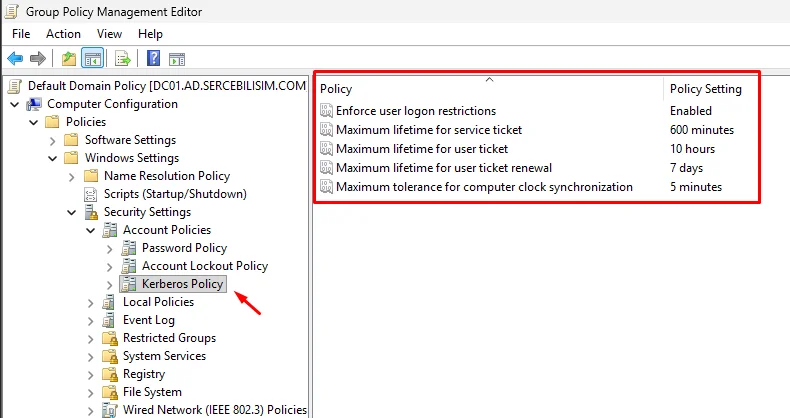
Know what you gain and give before changing these. Longer lifetimes reduce KDC load and add comfort, and lengthen how long a stolen ticket works. The misguided change I see in the field almost always goes one way: a fault appears, the tolerance or lifetime is raised, the fault is hidden, and the cause stays.
What Is an SPN? The Most Often Misconfigured Part
An SPN is a service’s name in the Kerberos world, written service-class/host. cifs/fs01.ad.sercebilisim.com is a file share, HTTP/portal.ad.sercebilisim.com a web application, MSSQLSvc/sql01.ad.sercebilisim.com:1433 a SQL instance.
One rule, and every SPN fault breaks it: an SPN may be registered on only one account in the domain. When the same SPN appears on two accounts, the KDC can’t choose and refuses to issue a ticket.
setspn -L lists an account’s SPNs. The real output for the lab client (the OU names are Turkish because the lab’s OU tree was built for the Turkish original: Bilgisayarlar means Computers, Genel_Mudurluk Head Office, Lokasyonlar Sites):
Registered ServicePrincipalNames for CN=PCTEST01,OU=Bilgisayarlar,OU=Genel_Mudurluk,OU=Lokasyonlar,DC=ad,DC=sercebilisim,DC=com:
        WSMAN/PCTEST01
        WSMAN/PCTEST01.ad.sercebilisim.com
        RestrictedKrbHost/PCTEST01
        HOST/PCTEST01
        RestrictedKrbHost/PCTEST01.ad.sercebilisim.com
        HOST/PCTEST01.ad.sercebilisim.com
The pattern is the same on every machine account, and once you see it SPNs make sense: every name is registered twice, short name and FQDN. A client can connect as \\PCTEST01 or \\PCTEST01.ad.sercebilisim.com, and the KDC must find whichever form was requested. Registering one form and forgetting the other is the most common cause of “works with the short name, not with the FQDN.”
Scan the whole domain for duplicates:
setspn -XA healthy environment ends like this:
Checking domain DC=ad,DC=sercebilisim,DC=com
found 0 group of duplicate SPNs.Duplicate SPNs are always born the same way: an application is installed under one service account, the account is changed, and the old SPN isn’t removed. Or an app moves from the machine account to a dedicated service account. Both accounts claim the same name, and from then on Kerberos doesn’t work for that service; authentication silently drops to NTLM.
Diagnosing Kerberos: From Symptom to Error Code
Kerberos failures are hard to diagnose because the error messages never say “Kerberos.” Users say “I can’t sign in,” “I can’t open the share,” or “the application keeps asking for my password.” The screen talks about trust relationships, access denied, or an unreachable domain. Getting down to the authentication layer is the technician’s call; the message won’t lead you there. So diagnosis starts from the symptom, not the error code:
| Symptom | Likely layer | Check first |
|---|---|---|
| Nobody can sign in, “domain unavailable” | Name resolution or time | SRV records, clock offset |
| Sign-in works, one application asks for a password | SPN | setspn -X |
| Works on some machines, not others | Time or encryption type | w32tm /stripchart, KRB-ERROR code |
When you have an error code, here’s what it means. Numbers are included, because Wireshark’s kerberos.error_code field shows the number, not the name:
| Code | No. | Meaning | Real cause |
|---|---|---|---|
KDC_ERR_PREAUTH_REQUIRED | 25 | Pre-authentication required | Not an error; the first step of every healthy flow |
KRB_AP_ERR_SKEW | 37 | Clock skew beyond tolerance | Client or server time source broken |
KDC_ERR_PREAUTH_FAILED | 24 | Pre-authentication failed | Wrong password or locked account |
KDC_ERR_S_PRINCIPAL_UNKNOWN | 7 | Requested SPN not found | SPN never registered |
KDC_ERR_PRINCIPAL_NOT_UNIQUE | 8 | SPN on more than one account | Duplicate SPN |
KDC_ERR_ETYPE_NOSUPP | 14 | Encryption type not supported | Client and account encryption settings diverged |
KRB_AP_ERR_MODIFIED | 41 | Service couldn’t open the ticket | SPN on the wrong account; keys don’t match |
The first two rows were produced deliberately in the lab and verified at packet level; the rest come from Microsoft’s troubleshooting documentation. The first row is there because 25 isn’t a failure code, yet the first reflex on seeing it in a capture is to treat it as one.
Kerberos vs. NTLM, and the Silent Fallback
When Kerberos fails, Windows usually doesn’t show an error: it falls back to NTLM. NTLM predates Kerberos and uses no tickets; client and server run a challenge/response exchange, and the domain controller is asked on every access.
| Property | Kerberos | NTLM |
|---|---|---|
| Method | Time-limited ticket | Challenge/response |
| DC consulted | Only when getting a ticket | On every access |
| Mutual authentication | Yes | No |
| Needs a service name | Yes (SPN) | No |
The last row is the point. NTLM doesn’t need an SPN, so when an SPN is misconfigured, things keep working. The user gets in, nobody reports a fault, and a service with Kerberos effectively disabled quietly carries on. That’s why SPN errors go unnoticed for months.
Check for the fallback by asking for the ticket:
klist get cifs/fs01.ad.sercebilisim.comIf a ticket comes back, Kerberos works. If you get KDC_ERR_S_PRINCIPAL_UNKNOWN but the application still opens, the fallback happened. On the server side, sign-in events in the Security log show Authentication Package as NTLM instead of Kerberos. Where the document system fails, the gate doesn’t close; it reverts to the old way, the guard asking whether they know you. It works, but it leaves no trail and it’s weaker.
Diagnosis Order
Keep this order: each step is the prerequisite for the next, and examining an upper layer while a lower one is broken wastes time.
1. Can the KDC be found? Clients find domain controllers through SRV records in DNS. Without them, Kerberos never starts.
nslookup -type=SRV _kerberos._tcp.ad.sercebilisim.comThe output should show dc01.ad.sercebilisim.com and port 88. If not, the problem is DNS, not Kerberos; see Active Directory DNS.
If the query comes back empty but you’re sure the DC is healthy, ask the same question over TCP before accepting the result:
Resolve-DnsName _kerberos._tcp.ad.sercebilisim.com -Type SRV -Server 192.168.1.10 -TcpOnlyDNS uses UDP by default, and UDP is open to interception along the path. Many home routers and some corporate security appliances transparently redirect UDP port 53 to their own resolver; you think you’re asking your internal server while the answer comes from elsewhere. TCP isn’t intercepted the same way. If the two transports give different answers, the problem isn’t your DNS server; it’s on the path. A quick confirmation: send a query to an address with no DNS server on it. If an answer comes back, whatever produced it isn’t the machine you asked. The lab measurement of exactly this, the same name returning two different addresses over UDP and TCP, is in What Is DNS?
2. Are the clocks close? Beyond 5 minutes the flow stops at the first message.
w32tm /stripchart /computer:dc01.ad.sercebilisim.com /samples:5 /dataonlyWhen you find skew, the reflex is w32tm /resync /force, and it will probably say “The command completed successfully.” Measure again, and the offset may not have moved at all. That’s exactly what happened in the lab: a 128-second offset stayed the same before and after the resync, with no error from the service (Last Sync Error: 0). The reason is in the Windows Time setting MaxAllowedPhaseOffset:
MaxAllowedPhaseOffset: 300
Phase Offset:          -128.3335403s
State Machine:         1 (Hold)
When the offset is larger than this threshold, Windows corrects the clock at once (a step); when it’s smaller, it doesn’t, and slowly closes the gap by changing the clock rate (slewing). 128 seconds was under the threshold, so the service decided there was no hurry and sat in Hold.
Now look at two numbers together: Windows’ step threshold is 300 seconds, and Kerberos’s tolerance is 300 seconds. The same number. The system therefore crosses its most dangerous zone most quietly: an offset just under 300 isn’t urgent to Windows, gets slewed over hours with no warning, and sits one step from Kerberos’s breaking point. Drift a little further and authentication stops suddenly, with no symptom beforehand. So look not at the output of resync but at the measurement after it. If the offset didn’t drop, lower the threshold temporarily to force a step, then put it back to 300.
The same measurement turned up a second problem, on the other end of the chain, and the Turkish original leaves it out. Checking where dc01 itself got its time, the answer was nowhere: its status reported Source: Local CMOS Clock, reference ID LOCL, and stratum 1. The domain’s PDC emulator, the one machine every other clock in the domain follows, was taking its time from its own hardware clock and announcing itself as a top-level authority. At that moment it happened to be within 0.39 seconds of the lab’s NTP server and of time.windows.com, so nothing was broken. But that was luck, not design: the lab has an NTP server fed from a national time source precisely so that the PDC can follow it, and the PDC wasn’t.
Two things make this worth checking on your own domain:
- Nothing warns you. A PDC on its local clock produces no error. Every member syncs to it happily, Kerberos works, and the whole domain drifts together; skew between machines stays small because they all share the same wrong clock. It shows up only against the outside world: certificates, cloud sign-ins, log correlation with external systems.
- It’s the step the time chain assumes and nobody checks. The chain is simple (the PDC emulator follows an outside source, everyone else follows the PDC emulator), and the first half is the one that’s quietly missing. On the PDC emulator,
w32tm /query /sourceshould name an NTP server, notLocal CMOS Clock, andw32tm /query /statusshould show a stratum below that server’s, not1.
3. Can a TGT be obtained? Whether there’s a TGT tells you if the failure is at the AS stage or later.
klist tgt4. Can a service ticket be obtained? A TGT without a service ticket puts the problem on the SPN side.
klist
setspn -X
5. Which message does it stop at? If it’s still unclear, capture with Wireshark and match the error-code in the KRB-ERROR message to the table above.
The value of this order: up to step four you haven’t touched a server or changed a setting, and you’ve measured which layer the fault is in. The most expensive Kerberos mistake is acting before measuring. Raising the tolerance, recreating the account, or removing and re-adding the machine to the domain usually doesn’t remove the cause; it just hides the symptom for a while.
Conclusion: The Dog at the Gate Knows Nobody
What makes Kerberos hard to understand isn’t complexity but invisibility. When it works, nobody notices; a user types a password in the morning, is never asked again, and never thinks about the six messages behind it. When it breaks, it doesn’t introduce itself; it looks like something else failing.
The chain built here closes that gap: from the name to the three parties, from the parties to the ticket model, from tickets to six messages, from messages to error codes. Facing a Kerberos fault, the question is no longer “why doesn’t Kerberos work” but “which message did the flow stop at.” The second can be measured; the first can’t.
The dog at the gate doesn’t know you and doesn’t need to. It looks only at the document: is it valid, is the date right, did the right authority issue it. That’s what makes authentication trustworthy: a system based on recognizing people can be fooled, while a system based on documents can only be fooled if the document is forged. Kerberos’s whole design is about making that document unforgeable, and, as the lab’s PDC showed, it still depends on someone checking where the clock gets its time.
Questions about Kerberos
This article is adapted from a guide the author first published in Turkish on sercebilisim.com: Kerberos Nedir? Kimlik Doğrulama ve Bilet Mantığı

Written by
İlker PehlivanNetwork and systems engineer, founder of Serçe Bilişim
I run the networks and servers that other people's work depends on. Before founding my own consultancy I administered the backbone network, firewalls and core systems of a large multi-site organisation with thousands of users. I write about the things that actually broke.
Related articles
Active Directory DNS: Forwarders, Reverse Zones, Split-Brain
Configure Active Directory DNS on Windows Server: forwarders, reverse lookup zones, conditional forwarders, and the split-brain setup that broke our own site.
How to Join a Computer to an Active Directory Domain
Join Windows PCs and servers to Active Directory: DNS, time, and hostname prerequisites, Add-Computer, OU placement with redircmp, and the most common errors.
Install Active Directory Certificate Services (AD CS)
Install Active Directory Certificate Services step by step: Enterprise Root CA setup, the four irreversible decisions, AIA/CDP, backup and end-to-end verification.
What Is LDAP? Directory Queries, Bind, and LDAPS
What LDAP is, how a query is built from base DN, scope and filter, the three bind types, and why 389 vs 636 isn't a preference, shown with captured packets.
On this page
Part of this guide
Active Directory Guide: Architecture, DNS, Security